星期一, 4月 20, 2015

Python Text Classification using Naive Bayes and scikit-learn


Feature extraction (特徵擷取) [5]

CountVectorizer implements both tokenization (英文分詞) and occurrence counting(計算英文文字出現計數) in a single class:
>>>
>>> from sklearn.feature_extraction.text import CountVectorizer
This model has many parameters, however the default values are quite reasonable (please see the reference documentation for the details):
>>>
>>> vectorizer = CountVectorizer(min_df=1)
>>> vectorizer                     
CountVectorizer(analyzer=...'word', binary=False, decode_error=...'strict',
        dtype=<... 'numpy.int64'>, encoding=...'utf-8', input=...'content',
        lowercase=True, max_df=1.0, max_features=None, min_df=1,
        ngram_range=(1, 1), preprocessor=None, stop_words=None,
        strip_accents=None, token_pattern=...'(?u)\\b\\w\\w+\\b',
        tokenizer=None, vocabulary=None)
Let’s use it to tokenize and count the word occurrences of a minimalistic corpus of text documents:
說明: 
fit函式代表tokenize,加入到字典陣列vocabulary 
fit(raw_documents[, y])Learn a vocabulary dictionary of all tokens in the raw documents.
transform函式用來計計算英文文字出現計數
transform(raw_documents)Transform documents to document-term matrix.
fit_transform(raw_documents[, y])Learn the vocabulary dictionary and return term-document matrix.
>>>
>>> corpus = [
...     'This is the first document.',
...     'This is the second second document.',
...     'And the third one.',
...     'Is this the first document?',
... ]
>>> X = vectorizer.fit_transform(corpus)
>>> X                              
<4x9 matrix="" numpy.int64="" of="" sparse="" type="">'
    with 19 stored elements in Compressed Sparse ... format>
The default configuration tokenizes the string by extracting words of at least 2 letters. Each term found by the analyzer during the fit is assigned a unique integer index corresponding to a column in the resulting matrix. This interpretation of the columns can be retrieved as follows:
>>>
>>> vectorizer.get_feature_names() == (
...     ['and', 'document', 'first', 'is', 'one',
...      'second', 'the', 'third', 'this'])
True

>>> X.toarray()           
array([[0, 1, 1, 1, 0, 0, 1, 0, 1],
       [0, 1, 0, 1, 0, 2, 1, 0, 1],
       [1, 0, 0, 0, 1, 0, 1, 1, 0],
       [0, 1, 1, 1, 0, 0, 1, 0, 1]]...)

說明: 
經過特徵擷取後,可以利用get_feature_names()取得特徵索引字串字典,接著對映到結果計數陣列。
呼叫X.toarray()可以看出,每個文件,例[0, 1, 1, 1, 0, 0, 1, 0, 1]所對映到的英文字計數....
'This is the first document.' ->['and', 'document', 'first', 'is', 'one','second', 'the', 'third', 'this']


get_feature_names()Array mapping from feature integer indices to feature name


References:

1. Machine Learning Tutorial: The Naive Bayes Text Classifier

2. Naive Bayes

3. Working With Text Data — scikit-learn 0.16.1 documentation

4. Text Classification

5. Feature extraction

Videos:

高一下數學3-0引言01什麼是機率

高一下數學3-3A觀念01條件機率的概念


星期四, 4月 16, 2015

node js tcp socekt end and close different

Good Reference: http://maxogden.com/node-streams.html


end(): Half-closes the socket. i.e., it sends a FIN packet. It is possible the server will still send some data. only closes the writing stream of the socket, the remote host can keep his writing stream open and send you data.
destroy(): Ensures that no more I/O activity happens on this socket. Only necessary in case of errors (parse error or so).


Event: 'end'#
Emitted when the other end of the socket sends a FIN packet.

By default (allowHalfOpen == false) the socket will destroy its file descriptor once it has written out its pending write queue. However, by setting allowHalfOpen == true the socket will not automatically end() its side allowing the user to write arbitrary amounts of data, with the caveat that the user is required to end() their side now.

Event: 'error'#
Error object
Emitted when an error occurs. The 'close' event will be called directly following this event.

Event: 'close'#
had_error Boolean true if the socket had a transmission error
Emitted once the socket is fully closed. The argument had_error is a boolean which says if the socket was closed due to a transmission error.

星期日, 3月 15, 2015

Uniform Server, Ripple Chrome Extension, Nodejs, ExpressJS, Swig, D3JS, RickShaw.js, Socket.io

http://www.uniformserver.com/

The Uniform Server is a lightweight server solution for running a web server under the WindowsOS. Less than 10MiB, it includes the latest versions of Apache2, Perl5, PHP5, MySQL5, phpMyAdmin and more. No installation required! No registry dust! Just unpack and fire up

Ripple Chrome Extension
可以模擬各種行動裝置大小,方便做行動網頁設計。


Node Swig 樣版
http://paularmstrong.github.io/swig/
採用跟 python django同樣的模版語言,容易維護。

MangoDB
儲存資料

d3.js

Express JS

rickshaw.js
http://code.shutterstock.com/rickshaw/
利用d3來做各種線圖。


Socket.io
利用websocket來做browser即時通訊

Windows Terminal, Command Line Shell Suggestion

ConEmu is opensource console emulator with tabs, which represents multiple consoles and simple GUI applications as one customizable GUI window.

推薦,中文輸入記得進入Setting中,把monospace選項取消,中文字就可以正常移動。

星期一, 3月 09, 2015

apache2.conf vs site-avaliable virtualhost configuration 設定

Reference:

http://stackoverflow.com/questions/22579159/apache2-conf-vs-site-avaliable-virtualhost-configuration

結論:  site-available 裡的設定最後還是會被merge到apache2.conf。二種方式是一樣的,只是 site-available的方式比較方便管理多個網站。

星期二, 3月 03, 2015

星期六, 2月 28, 2015

su, sudo,sudo su

su
登入為root,需要輸入root的密碼,比較不安全。(fedora及大部份的distribution,建立系統時會建立root帳號及密碼)

sudo command
短暫取得root權限,執行後面指定的command命令。需要輸入自已己帳號的密碼,而不是root帳號的密碼。只有加入到sudoer檔案的帳號才可以執行sudo命令。優點,安全性較高,可避免登入到root帳號後,不小心下錯指令,導致大範圍失誤。( 在ubuntu系統中,預設不會建立root密碼啟用root登入功能。當需要執行root權限所需的命令時,都採用sudo command的方式來做。)

sudo su
同su功能,切換為root。即請sudo執行su命令,所不同的是輸入自己帳號密碼,而不是root密碼。原理當使用者輸入自己密碼後即取得root權限,此時再執行su,等同執行su root,就會切換成root身份。
為什麼要多此一舉? 因為在ubuntu系統中,預設不會建立root密碼啟用root登入功能。當需要執行root權限所需的命令時,都採用sudo command的方式來做。有時候要執行很多系統命令時,可以採用sudo su方式,切換到root身份後再下指令會比較方便。

WireShark 封包抓取學習好文章

Good Reference:

一站式学习Wireshark(一):Wireshark基本用法
https://community.emc.com/thread/194901

十大免费又好用的网络分析工具
https://community.emc.com/message/788944#788944

apache 權限設定好文章

Reference:
What permissions should my website files/folders have on a Linux webserver?

http://serverfault.com/questions/357108/what-permissions-should-my-website-files-folders-have-on-a-linux-webserver

星期三, 2月 25, 2015

iOS, Android, phonegap Push Notification

Good Reference:

iOS APNS 訊息推播 - Apple Push Notification Service 介紹
http://blog.toright.com/posts/2806/ios-apns-%E8%A8%8A%E6%81%AF%E6%8E%A8%E6%92%A5-apple-push-notification-service-%E4%BB%8B%E7%B4%B9.html

如何透過 PHP 發送 Apple Notification Push
http://blog.toright.com/posts/2846/%E5%A6%82%E4%BD%95%E9%80%8F%E9%81%8E-php-%E7%99%BC%E9%80%81-apple-notification-push.html


Android Push Notification推播通知訊息給Android客戶端
http://magiclen.org/android-push-notification/

Android GCM (Google Cloud Messaging):Server Side
http://blog.kenyang.net/2013/07/android-gcm-google-cloud.html

Android GCM (Google Cloud Messaging):Android Client Side
http://blog.kenyang.net/2013/07/android-gcm-google-cloud_1.html

Django and Facebook API

Good Reference:
Signing Up and Signing In: Users in Django with Django-AllAuth
https://speakerdeck.com/tedtieken/signing-up-and-signing-in-users-in-django-with-django-allauth

使用allauth套件對新手最方便

DjangoCon 2013 - Rapid prototyping and communicating with clients
http://www.slideshare.net/katychuang/kat-rapid-prototyping
django網站規劃好文章


星期一, 2月 23, 2015

金門好吃小籠包-進麗小籠包

在城煌廟對面,有賣小籠包、水煎包、倆相好。小籠包皮厚有麵香,內餡豬肉飽實,富有肉汁,沾上特製醬油包及辣椒,很好吃。


星期二, 2月 17, 2015

Android Custom View

Good Reference:

http://blog.csdn.net/lmj623565791/article/details/24252901

comments:

1. 定義屬性檔,檔名不重要,重要的是內容
2. 屬性檔內的<declare-styleable>標簽會被編譯為R.styleable.XXX,在Custom View 中的Constructor 中要去存取標簽的內容,取得設定值,設定成員變數內容
3. 在OnDraw中,根據之前取得的成員變數內容繪置Custom View
4. OnMeasure 要處理wrap_content的寬度設定,否則layout會有問題。


星期一, 2月 16, 2015

Compile Google VP9 with visual studio 2013


System: windows 8.1 64 bit

Reference:
http://www.webmproject.org/code/build-prerequisites/
http://blog.csdn.net/kl222/article/details/23101115

1. Download  Yasm 32bit
http://yasm.tortall.net/Download.html

Note: Must download 0.8.0 version, otherwise, there will cause compile errors

rename yasm-0.8.0-win32.exe to yasm.exe
Set environment path:


2. Download MinGW
http://sourceforge.net/projects/mingw/files/Installer/

3. Install MSYS

4. Execute the command line environment of VS2013

5. type  d:\mingw\msys\1.0\msys.bat

5. type cd d:/project/vp9/libvpx-v1.3.0/build


6. type $ ../configure --disable-shared --enable-static --enable-static-msvcrt  --disable-docs --disable-examples --target=x86-win32-vs12 --prefix=/usr/local/msvc


7. type make


8. errors occurs

9. find vpx.sln
10. open and correct it
11. take care of test_libvpx references, and set the linker option of vpx /SAFESEH:NO

12. make 
13. if there still errors, please open visual studio and check linker option again and then rebuild.
14. Good luck.


星期五, 2月 06, 2015

Open CV

Good Site:

http://opencv-code.com/


矩型影像校正,"Automatic perspective correction for quadrilateral objects", 
http://opencv-code.com/tutorials/automatic-perspective-correction-for-quadrilateral-objects/

星期三, 2月 04, 2015

Windows 8 Apple Photostream沒有同步

因為不明原因,PhotoSteam無法跟 Windows 同步,解決方式如下:

  1. Kill these processes:
    ApplePhotoStreams.exe , ApplePhotoStreamDownloader.exe , APSDaemon.exe , iCloudServices.exe, iCloud.exe
  2. Delete this folder:
    %AppData%\Apple Computer\MediaStream
  3. Launch iCloud Control Panel. You will notice that Photos is not sync. Enable it and apply it.

Reference:
http://www.tinkertry.com/fix-the-issue-where-you-upgrade-to-windows-8-1-then-your-photo-stream-stops-updating/

星期二, 2月 03, 2015

Mac App Developer ID and Gatekeeper

Mac App Sign 方式有三種

  • Development-  測試
  • Distribution 上架
  • Developer ID 用在Outside of Mac App Store
GateKeeper
  • 所有從網路下載的軟體app, 會被加上標記,由GateKeeper管理
  • 本地端的app,不會被加上標記,不受GateKeeper影響
  • 預設只有Mac App Store 及Developer ID 簽章的App, 才可以執行

星期六, 1月 31, 2015

澳門銀河渡假村


澳門銀河渡假村正門
銀河內金羊

鑽石秀

美食廣場前肚皮舞秀

星期日, 1月 25, 2015

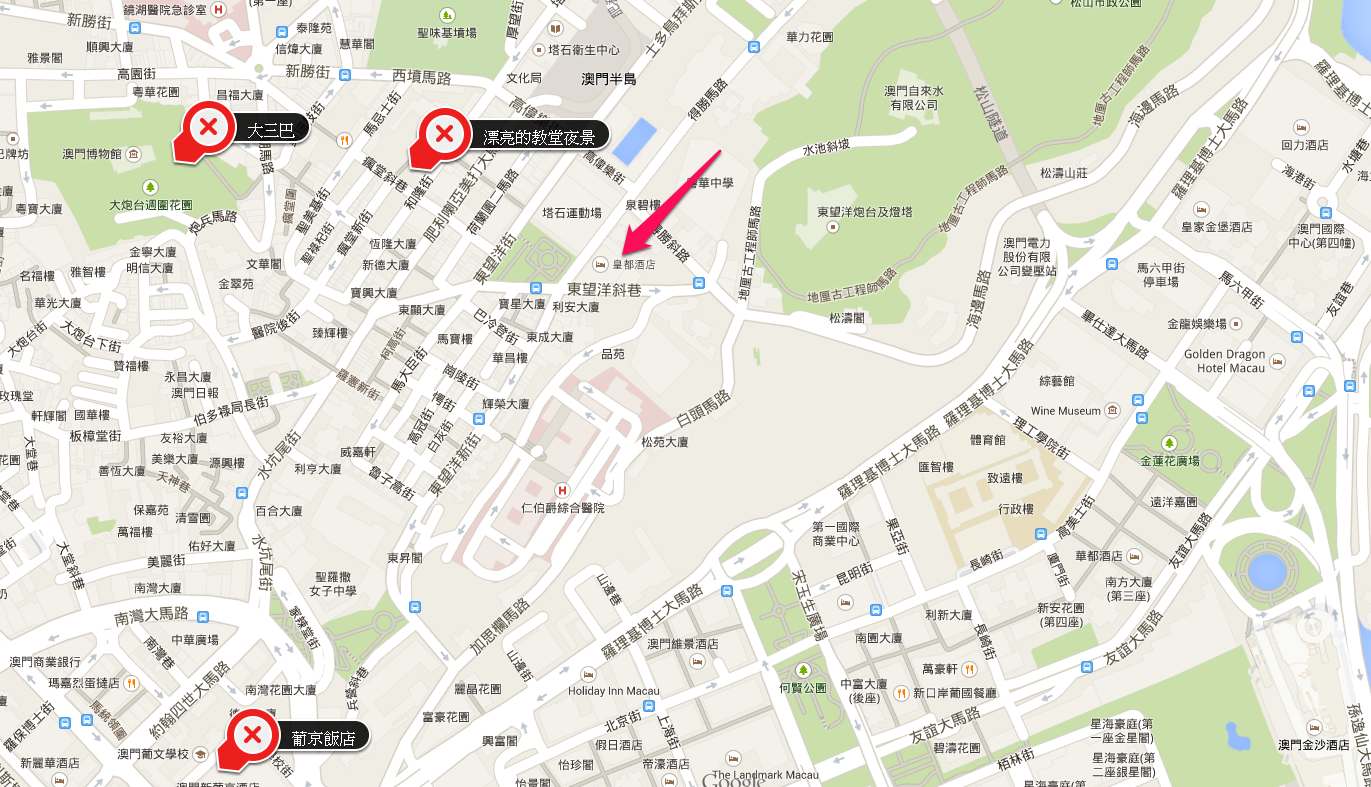
澳門皇都酒店

地點不錯,飯店前面有噴水池及公園,公園有兒童遊樂場。前面有一條街,夜景很漂亮。走路約15分,可以走到大三巴牌坊。


皇都位置便利